LongPlus
- 2.9
- Rating
- 50.00K
- Installs
- Free
- Price

 Analysis by App-foxy
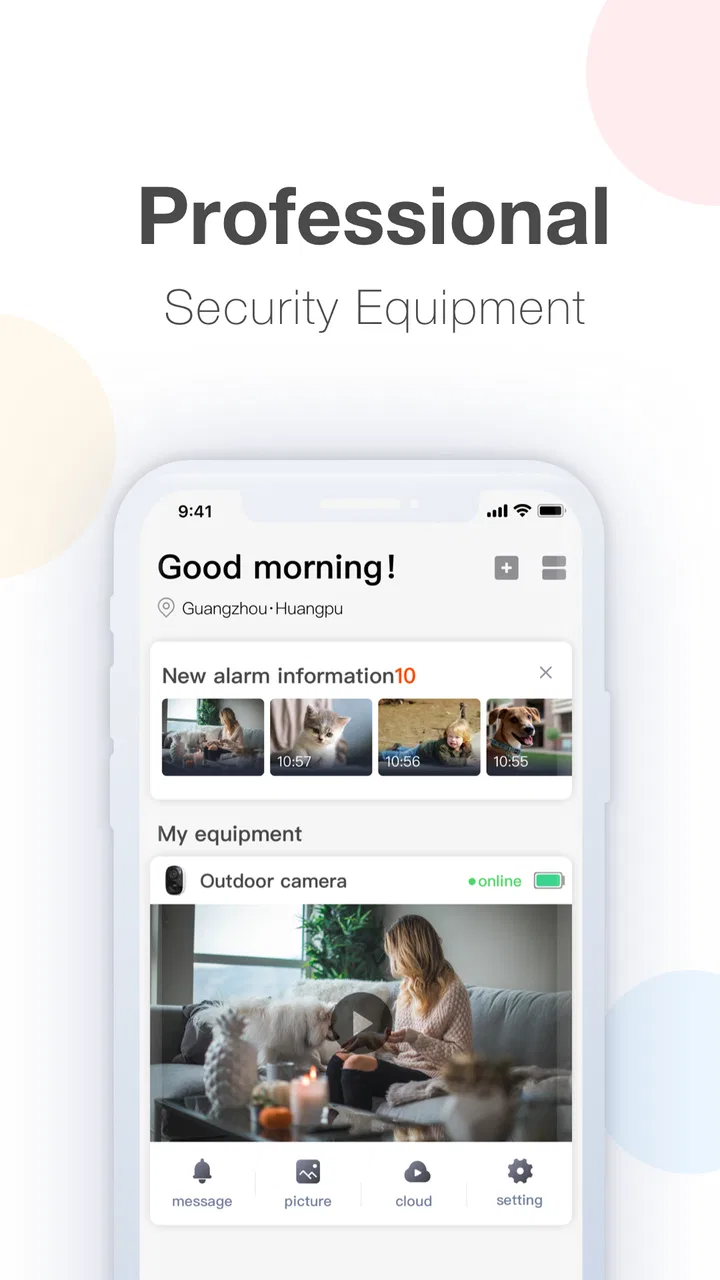
When a security camera is already part of your home or workplace, the most useful app is often not the one with the longest feature list. It is the one that lets you check what is happening without turning a quick glance into a frustrating session. LongPlus is built for that narrow purpose: it is a free video-monitoring app from CREATIVE SECURITY LIMITED that connects to compatible cameras through a peer-to-peer setup and shows live video on a phone or tablet.
I approached it as a practical viewing tool rather than a general video editor, despite its placement in the Video Players & Editors category. That distinction matters. You are not opening it to trim clips, browse entertainment or manage a media library. You are opening it because you want to see a camera feed, usually at a moment when speed and dependable recovery matter more than visual polish.
The app is available for everyone, runs on Android devices using at least Android 5.0, and has passed the point of being a brand-new experiment. It was released on June 26, 2019, and its current version is 24.1.1.20240120. Those details suggest a product with time behind it, although the user experience still depends heavily on the camera hardware, network path and the way the particular installation has been configured.
You May Also Like

 Blood Strike: 2.5 Anniversary
Blood Strike’s Loadouts Turn Every Drop Into a Tactical Gamble
A close look at Blood Strike’s custom loadouts: how fast access to signature weapons reshapes its battle royale rhythm, rewards preparation, and narrows the gap between fights.

 Pandora - Music & Podcasts
Pandora’s Music Is Easy to Start, but Harder to Recover
Pandora’s strength is its low-effort path from a seed to a station. Its weak spot is how much confidence it asks you to place in connection, setup, and quiet recovery.

 8 Ball Pool
 Is Built on Rivalries, Rematches, and Routine
A close look at the rivalries, rematches, shared routines, and unanswered safety questions that turn a quick pool match into a persistent mobile community.

 Samsung Music
’s Quiet Strength Is Playing What You Already Own
Its reach comes less from spectacle than from dependable access to a personal library. That simplicity is both the app’s strongest retention engine and its ceiling.

 AccuWeather: Weather Radar
AccuWeather Review: A Quick, Clear Forecast for Everyday Decisions
For everyday plans, the best forecast is the one you can understand quickly. AccuWeather makes rain timing, radar, and local conditions easy to act on, with a few trade-offs.

 Hill Climb Racing
Why Hill Climb Racing Still Turns Crashes Into One More Run
A tiny car, a bumpy hill and one more upgrade: Hill Climb Racing keeps resurfacing because its simple chaos makes every near-miss feel personal.
More From Our News Desk
View All News


What LongPlus feels like during everyday monitoring
I find LongPlus easiest to judge by the small, practical moments it is meant to support: checking a camera feed without turning monitoring into a bigger task. In the sections ahead, I’ll focus on how to make that first check useful and how to tell whether the app suits your routine. A little preparation can make the difference between a reassuring glance and an unclear screen.
A quick live check is its natural job
My first impression of this kind of app is shaped by the time between tapping the camera and seeing something useful. LongPlus is most convincing when treated as a live window into an existing monitoring system. The peer-to-peer approach is intended to make that connection direct enough for remote viewing, but it does not magically remove the variables that affect a camera feed. A weak home connection, busy mobile data or a camera that is slow to wake can still make the experience feel delayed.
For a normal check, I would open the app, choose the relevant camera and give the live view a moment to establish itself before repeatedly tapping controls. That small habit is more important than it sounds. With monitoring software, impatient repeated actions can make a connection feel less stable because the user is changing screens before the first request has completed. LongPlus is better judged by whether it settles into a usable feed than by whether every launch is instant.
The app’s strongest speed scenario is a simple one: you already know which camera you need and only want to confirm a situation. Is the entrance clear? Is a delivery still outside? Did someone arrive at the office? For those questions, a live P2P viewer can be more convenient than opening a browser dashboard or logging into a larger surveillance platform. The focused design is an advantage when the task is visual confirmation rather than administration.
It is less suitable when you expect the immediate responsiveness of a local display connected directly to a recorder. Remote monitoring always introduces more points where delay can appear, and LongPlus should be considered a viewing client, not a replacement for a dedicated security monitor. If a decision depends on split-second timing, I would not rely on a phone app alone.
What happens when the app is used heavily
The demanding moments are not necessarily long viewing sessions. A short session can be more troublesome if it involves switching between several cameras, moving from a live feed to another screen and then returning, or trying to reconnect while the network is changing. Each transition asks the app and camera system to restore a usable path, so the perceived performance can vary more than it would in a simple one-camera check.
I would plan a multi-camera routine around observation rather than constant switching. If you are checking several rooms, look at each feed long enough to establish whether it is actually live, then move on. Rapidly cycling through views may save a few seconds when everything works, but it also makes it harder to tell whether a blank image is a genuine camera issue, a temporary connection delay or merely a screen that has not finished loading.
Long viewing sessions also bring a practical trade-off. A live video feed naturally uses more network activity and device resources than a static screen. I would avoid leaving the app open for hours on a phone that is already low on battery, especially when mobile data is being used. The app is most sensible as an on-demand monitor: open it for a check, watch what you need, and close it when the situation is clear.
That workflow also helps with privacy in shared spaces. A phone left unattended with an active security feed can expose more than intended. LongPlus is more comfortable when the user treats the live view as a deliberate action instead of a permanent background display.
Reliability depends on recovery, not just connection
For a monitoring app, reliability is not simply the ability to connect once. The more revealing test is what happens after the connection is interrupted. A phone may move from Wi-Fi to mobile data, the camera may briefly lose its network, or the app may be pushed into the background. In those moments, I look for a straightforward path back to the feed rather than assuming that the first failed attempt means the camera is unavailable.
My practical advice is to treat recovery as part of the normal workflow. If the image does not appear, wait briefly before making several changes. If the app remains stuck, leave the view and reopen the camera rather than repeatedly pressing the same control. When a camera is physically reachable, checking its power and network connection is often more useful than blaming the phone application immediately.
This is one of the important trade-offs with a P2P monitoring client. The convenience of connecting remotely can be valuable, but the experience is tied to more than the app itself. A stable camera installation and a dependable network make LongPlus feel more trustworthy; a poorly configured device can make even a well-designed client seem unreliable.
I would also perform a recovery check before depending on it for a trip or an unattended property. Open the live view from the location where you normally use it, switch away briefly, and confirm that you can return to the feed. Then test it under the connection you will actually use while away. This is a more useful preparation step than assuming that successful setup automatically guarantees smooth remote access.
Older phones are supported, but that does not mean every phone feels equal
One appealing detail is the relatively broad Android compatibility. LongPlus supports Android 5.0 and later, which includes devices that are no longer considered modern. That can be helpful if you want to dedicate an older phone or tablet to camera viewing instead of buying a new screen.
Still, operating-system compatibility is only the entry requirement. Video display, network handling and the general responsiveness of the device can vary widely between older and newer hardware. On an older phone, I would keep expectations modest: use it for occasional checks, avoid treating it as a full-time multi-camera console, and make sure other heavy applications are not competing for memory.
A dedicated older tablet can be a sensible compromise for a small home setup, but it should be placed where its battery and network connection remain dependable. If it is used as a fixed viewer, the practical limitation may be the device’s power management rather than LongPlus itself. For a portable user, a newer phone will usually provide a more comfortable experience when switching between apps or recovering from interruptions.
The app is free to download, which makes trying it with compatible equipment relatively easy. In-app purchases range from $0.49 to $148.99 per item, so I would review any purchase prompt carefully instead of assuming that every part of the experience is included at no cost. The free entry point is useful for evaluating basic viewing, but the wide purchase range means the financial side deserves attention before committing to optional extras.
Who will get the most from this app
LongPlus makes the most sense for someone who already owns compatible monitoring equipment and wants a mobile way to see its live video. A homeowner checking an outdoor camera, a small shop owner checking a doorway or a family member keeping an eye on a property can all understand its purpose quickly. The app is especially appropriate when the main question is, “What is happening right now?”
Consider a realistic evening scenario. I might receive a delivery notification while I am upstairs, open the app, check the entrance camera and confirm whether the parcel is visible. I do not need a timeline, a video editor or a complicated control room for that moment. A focused live-view client can be faster than walking downstairs, and it avoids turning a simple check into a larger task.
Another useful workflow is remote reassurance during a short absence. Before leaving home, I would verify that the camera is online and that the view is recognizable. Later, I could use LongPlus for occasional checks rather than leaving the stream running continuously. This approach reduces unnecessary device use and makes it easier to notice whether the system is behaving normally.
The app is less attractive for people who want a complete security-management suite. If your priority is advanced recording organization, detailed event investigation, broad smart-home automation or a polished dashboard for many different camera brands, a manufacturer-specific platform or a professional surveillance system may be a better fit. LongPlus should not be chosen simply because it is listed among video applications; its value is tied to its monitoring role.
How it compares with ordinary alternatives
The usual alternatives fall into three groups: a camera maker’s own app, a browser-based camera portal and a dedicated recorder or monitor. A manufacturer’s app may offer deeper access to that brand’s settings and recordings. A browser portal can be convenient on a computer. A recorder with a connected display may be more dependable for continuous observation. LongPlus competes by putting the live view into a mobile-focused P2P client.
That can be an advantage when you are away from the camera and do not want to sit at a desk. It can also be simpler than a full surveillance interface when all you need is one current image. The compromise is that a mobile client is not automatically the best place for lengthy monitoring, detailed review or managing a large installation. For those jobs, the alternative with the larger screen and stronger administrative controls may be the better choice.
I would also compare the app with the camera maker’s official application before settling on it. If the official software provides a smoother setup, clearer device status or better access to recordings, it may justify using that instead. LongPlus becomes more compelling when it is the client your equipment expects or when its straightforward viewing workflow is enough for your routine.
Small habits that improve the experience
The first useful habit is to label your cameras in a way that reflects their real locations, if the connected system allows it. Names such as “front door” or “garage” are easier to act on than vague device identifiers when you are checking a situation quickly. This is not a flashy feature, but it directly reduces mistakes during a rushed moment.
The second is to test the app from outside your home network. A camera can look perfectly accessible while your phone is on the same Wi-Fi, yet behave differently when you are using mobile data or another network. A short test before travel can reveal whether your normal remote workflow is practical and can prevent false confidence.
The third is to separate viewing problems from camera problems. If only one camera fails, inspect that camera’s power and network path first. If every view struggles at once, look at the phone’s connection or the wider network. This simple comparison saves time because it avoids reinstalling the app whenever the actual issue is elsewhere.
A fourth tip is to keep the app’s role narrow. Use it for live confirmation, then close it. If you need evidence from earlier in the day or a long-term archive, plan that requirement around the camera system’s recording tools rather than assuming that a live-view client is also a complete video-management solution.
What the public response suggests
LongPlus has more than fifty thousand installs, so it has reached a meaningful group of Android users, but its average rating is 2.9 from around seven hundred ratings. There are also over two hundred written reviews. I would read that combination as a reason to approach the app with realistic expectations rather than as an automatic recommendation.
A rating in that range often reflects the difficulty of making a remote camera system feel consistent across different devices, networks and installations. It does not tell me that every user will have the same experience, but it does make setup quality and recovery behavior especially important. I would install it when I have compatible hardware ready to test, not as a standalone video app with value independent of a camera.
The Everyone age classification makes it broadly suitable from a content standpoint, though the live images it displays will naturally depend on the camera’s location and the people being recorded. Anyone sharing access should think carefully about who can view the feed and where the phone is used. That is a sensible privacy practice for any security-camera client, but it matters particularly when a free app makes it easy to install the viewer on several devices.
My performance verdict
In my view, LongPlus is best understood as a practical access point to a compatible P2P camera system, not as a universal answer for video monitoring. Its perceived speed is strongest during short, intentional checks. Its resource demands are easier to manage when the app is opened only when needed. Its stability depends substantially on the camera and network, and its recovery experience deserves testing before you rely on it away from home.
I would recommend giving it a try if you already have the right equipment, want mobile live viewing and can accept that remote video will not always behave like a locally connected monitor. The free download lowers the barrier to testing, while the in-app purchase range means I would avoid buying anything until the basic viewing workflow feels dependable on your own devices.
I would skip it if you need a professional control room, extensive recording analysis, guaranteed instant response or a single app that manages unrelated camera brands and security devices. In those cases, a dedicated recorder, a stronger manufacturer platform or a more complete surveillance service is likely to serve you better.
For the right user, the appeal is straightforward: open the app, reach the camera feed and answer a real-world question without unnecessary ceremony. That is a modest goal, but it is the goal LongPlus should be judged against. My final recommendation is cautious but positive for compatible camera owners who value quick remote checks and are willing to test recovery before depending on it.
FAQs for LongPlus
01What is LongPlus and what can I use it for?
LongPlus is a mobile application focused on creating and sharing short-form video content. After exploring its main features, the app appears designed for users who want to record, edit, discover, and interact with videos in a social feed. Depending on your region and app version, available tools may include music, effects, filters, templates, comments, likes, follows, and content recommendations.
02Is LongPlus free to download and use?
LongPlus can generally be downloaded without an upfront purchase, allowing users to create an account, browse videos, and use many of the basic social and editing features at no cost. However, users should review the current store listing and in-app notices because some functions, digital items, promotional features, or optional services may vary by country and could involve advertising, purchases, or other limitations.
03Does LongPlus require an account or personal information?
You may be able to open and browse parts of LongPlus without immediately creating an account, but an account is typically needed for interactive features such as uploading videos, following creators, commenting, liking content, or managing a profile. Registration may request information such as an email address, phone number, username, or third-party login details, so checking the privacy policy before signing up is recommended.
04Is LongPlus safe for children and teenagers?
Parents should not assume that all content on LongPlus is suitable for children. Like many social video platforms, the app may contain user-generated videos, public comments, direct interactions, advertising, and material that can vary in age appropriateness. Before allowing a minor to use it, review the platform’s age requirements, privacy settings, reporting tools, and parental controls, and discuss responsible sharing and online safety.
05What permissions does LongPlus need, and can I control them?
LongPlus may request access to features such as the camera and microphone for recording videos, photos or media storage for uploading and saving content, and notifications for alerts about activity or messages. Some permissions are optional and can be denied or changed later through Android or iOS settings. Limiting access may affect certain tools, but it can help reduce unnecessary collection of device data.
Pros
- Natural-looking results with smooth skin and realistic facial retouching.
- Offers creative templates and effects for quick photo transformations.
- Simple interface makes basic editing accessible to beginners.
- Supports portrait-focused edits for selfies and social media posts.
- Frequent style options help keep edits varied and visually engaging.
Cons
- Some advanced tools and effects require a paid subscription.
- Heavy filters can make faces look overly artificial if overused.
- Export options may be limited depending on the selected feature.
- Processing can take longer on older or less powerful phones.
- The app may request access to personal photos and other device permissions.

LongPlus
Gallery